


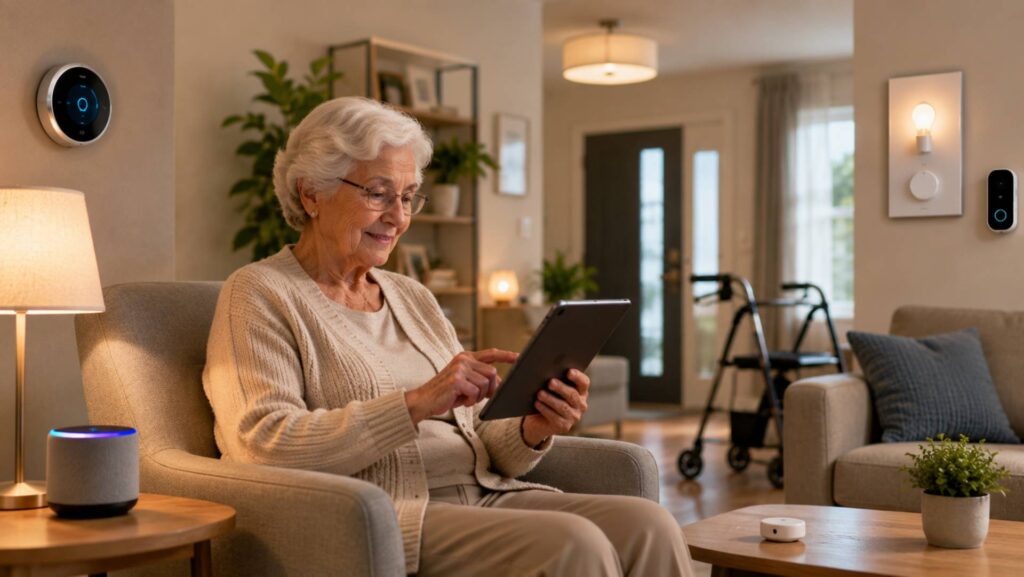
Smart home technology is often marketed around convenience. Turn the lights on with your phone. Adjust the thermostat from the sofa. Lock the front door without reaching for your keys.
But connected technology can offer something more meaningful than convenience. When thoughtfully chosen, smart home devices can make everyday tasks easier, reduce unnecessary physical effort, and give people greater control over their surroundings.
This can be particularly valuable for older adults, people with limited mobility, changing vision or reduced dexterity, and households supporting independent living.
The goal is not to automate everything or replace human support. It is to create a home that responds to the individual while preserving choice, privacy, safety, and the ability to operate systems manually when needed.
How Smart Home Technology Can Support Independent Living
Accessibility-focused smart home design starts with a simple question: Which everyday tasks are difficult, tiring, or inconvenient?
For one person, reaching a light switch may be challenging. For another, adjusting a thermostat, opening blinds, answering the door, or remembering routine tasks may be more difficult.
Connected technology can address some of these challenges by moving controls closer to the user or allowing certain functions to happen automatically.
Useful smart home features can include:
- Voice-controlled lighting
- Automated or motorised shades
- Smart locks
- Video doorbells
- Smart thermostats
- Motion and environmental sensors
- Connected appliance controls
- Automated reminders
- Smart plugs and switches
- Remote controls for selected household systems
The right combination depends on the person’s abilities, routines, home layout, and preferences.
Voice Control Can Reduce Physical Effort
Voice assistants can make everyday controls accessible without requiring someone to walk across a room or operate a small switch.
A voice command can potentially control compatible lights, thermostats, shades, plugs, televisions, or other devices.
This can be useful when someone has difficulty with:
- Standing for long periods
- Reaching switches
- Moving between rooms
- Handling small buttons
- Using touchscreens
- Operating traditional controls
Voice control can also be useful when both hands are occupied. For example, someone preparing food could adjust compatible lighting or temperature settings without leaving the kitchen.
However, voice control should be treated as an additional option rather than the only method of control. A physical switch or manual control remains important if the voice assistant fails, loses connectivity, or simply is not the user’s preferred method.
Automated Lighting Can Improve Everyday Comfort
Lighting is one of the easiest areas of a home to adapt with smart technology.
Instead of requiring someone to locate and operate a switch, smart lighting can be controlled through voice commands, apps, schedules, motion sensors, or other automation.
For someone with changing vision, good lighting can also help make the home easier to navigate.
For example, low-level lighting can automatically activate in a hallway or bathroom during the night. Lights can also be scheduled to turn on at particular times or respond to movement.
A practical lighting system might combine:
- Bright task lighting in kitchens and work areas
- Soft ambient lighting in living spaces
- Motion-activated lighting in corridors
- Night lighting in bathrooms and bedrooms
- Automated outdoor lighting near entrances
The important point is to avoid over-automation. Users should still be able to control the lighting directly whenever they want.
Motorised Shades Can Make Windows Easier to Manage
Traditional blinds and curtains can require reaching, pulling cords, or operating mechanisms that may be difficult for someone with limited mobility or dexterity.
Motorised shades offer another option.
Compatible shades can be opened or closed using a remote, app, wall control, voice command, or schedule. Some systems can also be integrated with other smart home controls.
This can make everyday routines simpler while providing control over:
- Daylight
- Glare
- Privacy
- Room temperature
- Bedroom darkness
For example, bedroom shades could close automatically in the evening and open gradually in the morning. Living-room shades could be adjusted during the day to reduce glare without requiring someone to operate them manually.
Manual operation should still be available wherever possible.
Smart Locks Can Simplify Access
Keys can be inconvenient for many people, particularly those who have difficulty gripping small objects or remembering where they have been placed.
Smart locks can offer alternative ways to control access, depending on the product. These may include codes, apps, compatible devices, or other authorised methods.
For independent living, the biggest advantage may be reducing the physical and mental effort associated with traditional keys.
Smart locks can also be useful in multigenerational households. An authorised family member or caregiver may be able to access the home without requiring someone inside to physically answer the door.
Security remains essential, however. Access permissions should be managed carefully, and users should understand how emergency access and manual unlocking work.
Video Doorbells Can Reduce Unnecessary Trips to the Door
Answering the front door can be physically demanding, particularly if the entrance is some distance from the main living area.
A video doorbell can allow residents to see who is outside before deciding whether to answer.
Depending on the system, users may also be able to communicate with visitors remotely.
This can provide greater control over unexpected visitors and reduce unnecessary movement around the home.
It can also be useful for deliveries. Instead of immediately walking to the door, a resident can check the visitor or delivery situation first.
Privacy settings should be reviewed carefully, especially where cameras capture shared entrances, neighbouring properties, or public areas.
Smart Thermostats Make Temperature Control Easier
Temperature controls can become difficult when thermostats are positioned in inconvenient locations or require small buttons and complicated menus.
A smart thermostat can make temperature adjustments more accessible through larger interfaces, remote controls, apps, schedules, or voice commands, depending on the system.
Automation can also reduce the need to repeatedly adjust the heating or cooling manually.
For example, a household could create a schedule based around its normal routine, while still allowing residents to make manual changes when circumstances change.
This balance matters. Automation should support the person rather than dictate how they use their home.
Environmental Sensors Can Provide Useful Awareness
Sensors can help monitor conditions around the home without requiring constant attention.
Depending on the system, environmental sensors can monitor factors such as:
- Temperature
- Humidity
- Water leaks
- Smoke or air-quality conditions
- Door or window activity
- Motion
- Changes in room conditions
These sensors can provide notifications when something unusual happens.
For example, a water sensor placed near a washing machine or water heater could alert a homeowner to a leak. A temperature sensor could provide a notification if a particular room becomes unusually cold or warm.
These systems can be helpful, but they should not automatically be treated as replacements for dedicated safety equipment, professional monitoring, or appropriate care.
Connected Appliances Can Reduce Unnecessary Tasks
Smart plugs and connected appliances can make some household routines easier.
A compatible appliance may be controllable remotely or through a schedule. Smart plugs can also allow certain ordinary devices to be switched on or off remotely, provided the appliance is suitable for that type of control.
This can be useful when a person has difficulty reaching an outlet or operating a particular switch.
However, connected control does not make every appliance safer to automate. Heating appliances and other equipment that generate significant heat require particular care.
Always follow the manufacturer’s instructions and use products only for their intended purpose.
Reminders Can Support Everyday Routines
Smart home technology can also help with routines that are easy to overlook.
Voice assistants, connected displays, phones, and other devices can provide reminders for everyday activities such as appointments, household routines, or other tasks.
The purpose is not to create constant alerts. Too many notifications can become frustrating and may cause important reminders to be ignored.
A better approach is to identify the few routines where reminders would genuinely add value.
Designing for Changing Needs
Accessibility needs can change over time.
A home that works well today may need different controls or automation later. This is why flexible technology can be more valuable than a highly complicated system built around one particular situation.
For example, a homeowner might initially install smart lighting and a smart thermostat. Later, motorised shades or voice controls may become useful.
Choosing systems that work together can make future changes easier.
It is also worth considering how easy the system will be for another person to understand. A family member, caregiver, friend, or professional may need to help manage the technology at some point.
Keep Manual Controls Available
One of the most important principles of accessible smart home design is choice.
Automation should not remove the ability to operate a device manually.
A smart light should ideally still have a usable physical control. Motorised shades should have an appropriate manual or alternative control method. Smart locks should have a dependable way to enter the home if technology fails.
This approach provides a fallback when:
- Wi-Fi goes down
- A device loses power
- Batteries run out
- A voice assistant fails
- An app stops working
- A user simply prefers physical controls
Reliability is part of accessibility.
Privacy Matters in an Accessible Smart Home
Many smart home devices collect information about how a property is used.
Cameras, microphones, motion sensors and connected appliances can reveal details about daily routines. This makes privacy an important part of system design.
Before installing a device, consider:
- What information does it collect?
- Where is that information stored?
- Who can access it?
- Can unnecessary data collection be disabled?
- Are user accounts protected with strong security measures?
- Can cameras or microphones be disabled when appropriate?
Only give other people the access they actually need.
For example, a family member may need access to a smart lock without necessarily needing access to every smart device in the home.
Smart Home Technology Should Support People, Not Replace Them
Technology can remove friction from everyday tasks, but it has limits.
A smart sensor cannot replace appropriate care. A video doorbell cannot replace personal contact. An automated reminder cannot guarantee that an important task has been completed.
This distinction is especially important when smart home technology is being considered for an older adult or someone who needs additional support.
The strongest approach combines technology with human judgement and appropriate support.
Smart devices can handle repetitive tasks and provide useful information. People remain responsible for decisions that require understanding, judgement, care, or personal interaction.
Practical Smart Home Scenarios
A Person With Limited Mobility
Someone who finds it difficult to move frequently could use voice-controlled lighting, a smart thermostat, automated shades, and selected smart plugs.
The goal is to reduce unnecessary trips across the room while keeping physical controls available.
Someone With Reduced Dexterity
Small switches and keys can be difficult to operate for someone with reduced hand strength or dexterity.
Voice commands, larger physical controls, remote controls, and automated routines can provide alternatives.
A Person With Changing Vision
Consistent lighting can make navigation easier. Motion-activated lights can help illuminate hallways and bathrooms, while voice control can reduce dependence on small buttons or touchscreens.
A Multigenerational Household
Smart home technology can provide convenience for several generations at once.
An older resident may benefit from accessible controls, while other household members can use apps, schedules, or remote access. Carefully configured permissions can allow family members to provide assistance without taking away the resident’s independence.
How to Choose Smart Home Technology for Accessibility
Avoid starting with a shopping list of devices.
Start with the person and their daily routine.
Ask:
- Which tasks are currently difficult?
- Which tasks require unnecessary physical movement?
- Are small buttons or controls difficult to operate?
- Would voice control be useful?
- Which devices need automation?
- What should always remain manually controllable?
- Who else may need authorised access?
- What happens if the internet or power fails?
- How will privacy be protected?
- Can the system be adapted if needs change?
This approach produces a more useful smart home than simply filling the property with connected products.
Frequently Asked Questions
Can smart home technology help older adults live independently?
Yes, selected smart home features can make some everyday tasks easier by reducing physical effort and providing alternative ways to control the home. The technology should complement, rather than replace, appropriate human support and care.
What smart devices are most useful for accessibility?
Useful options can include voice-controlled lighting, smart thermostats, motorised shades, smart locks, video doorbells, environmental sensors, and selected appliance controls. The most appropriate combination depends on individual needs.
Is voice control suitable for people with limited mobility?
It can be. Voice control allows compatible devices to be operated without reaching a physical switch or moving between rooms. It should ideally be paired with another control method for reliability.
Are smart locks safe for independent living?
Smart locks can provide convenient access options, but security and reliability need to be considered carefully. Users should understand access permissions, backup entry methods, battery requirements, and what happens during a power or connectivity failure.
Can smart home technology replace a caregiver?
No. Smart home technology can assist with certain tasks and provide useful notifications, but it should not be considered a replacement for appropriate care, supervision, or human support.
What happens if the internet stops working?
The answer depends on the device. Some smart home functions can continue working locally, while others may depend on cloud services. When choosing technology, check which functions remain available without an internet connection and maintain manual alternatives wherever practical.
How can smart home technology protect privacy?
Choose reputable devices, review privacy settings, secure accounts, limit permissions, and disable features that are not needed. Cameras and microphones deserve particular attention because they can collect highly personal information.
Conclusion
Smart home technology can make a meaningful difference when it is designed around people rather than products.
For older adults, people with limited mobility or dexterity, those experiencing changes in vision, and multigenerational households, simple features such as voice-controlled lighting, automated shades, smart locks, sensors, and temperature controls can reduce unnecessary effort while giving residents greater control over their surroundings.
The best accessible smart home is not necessarily the one with the most automation. It is the one that makes important everyday tasks easier without taking away choice.
Prioritise reliability, privacy, simple controls, manual overrides, and the individual’s actual needs. When technology is introduced thoughtfully, it can become a quiet form of support—helping people use their homes more comfortably and maintain independence while keeping human care and personal choice at the centre.